This is an archived thread from the StopByte developer forum —
browse all archived threads.
StopByte is now a payments & ecommerce toolkit — check out our
free calculators.
Google Maps Geocode keys were working properly before, and the problem only appeared yesterday, I am using Google Maps geocode API to get Addresses auto complete suggestions.
4 Likes
jms
(jms)
#2
make sure the Library API below is enabled :
Google Places API Web Service(enabled)
2 Likes
Yassine
(Yassine)
#3
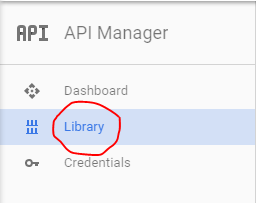
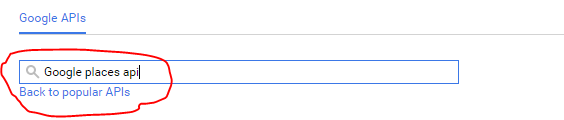
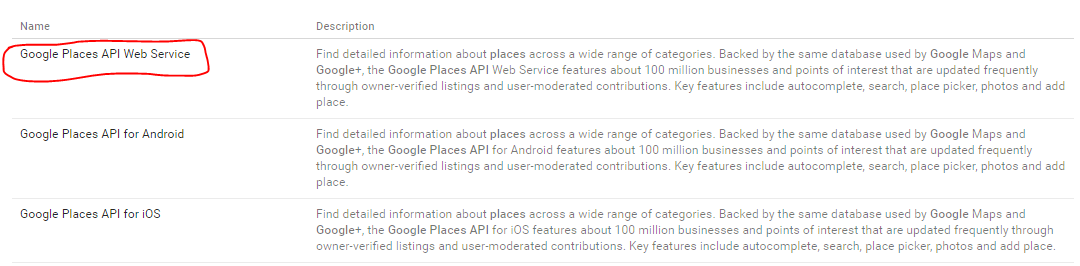
Here is how you enable the service “Google Places API Web Service” as @jms said :
NOTE: In case you are using this API for an Android or iOS App, you will have to use the other Libraries “Google Places API for Android” or “Google Places API for iOS”.
Finally on the Library you, will find an “Enable” button click it, in case it says “Disable” that means the library is already active:
The same thing works for all different Google API libraries.
Hope that helps anyone.
4 Likes
sparta
(this.is.sparta)
#4
the solution that might work for you as well, would be making sure that the Geolocation and Geocoding web services are both enabled.
By the way; in some cases after enabling the services you will have to wait up to 10 minutes for your changes to take effect.
1 Like
sam
(SAM)
#5
if none of the solutions suggested above didn’t work for you (though that’s awkward) you have one last chance of checking your QPM or QPS (Quota Per Month or Quota Per Second) as that can cause the problem as well, check your Google API dashboard if you reached your quota limit.
If you did reach the quota limit wait for it to reset, or add pauses to your code.
1 Like
Tas
(Tas Dever)
#6
Very perfect answer thanks @Yassine I was googling that and It brought me here
BiuraPrawne
(BiuraPrawne)
#7
I lost 2 days fixing this problem. Thanks a lot!!!

 thanks @Yassine I was googling that and It brought me here